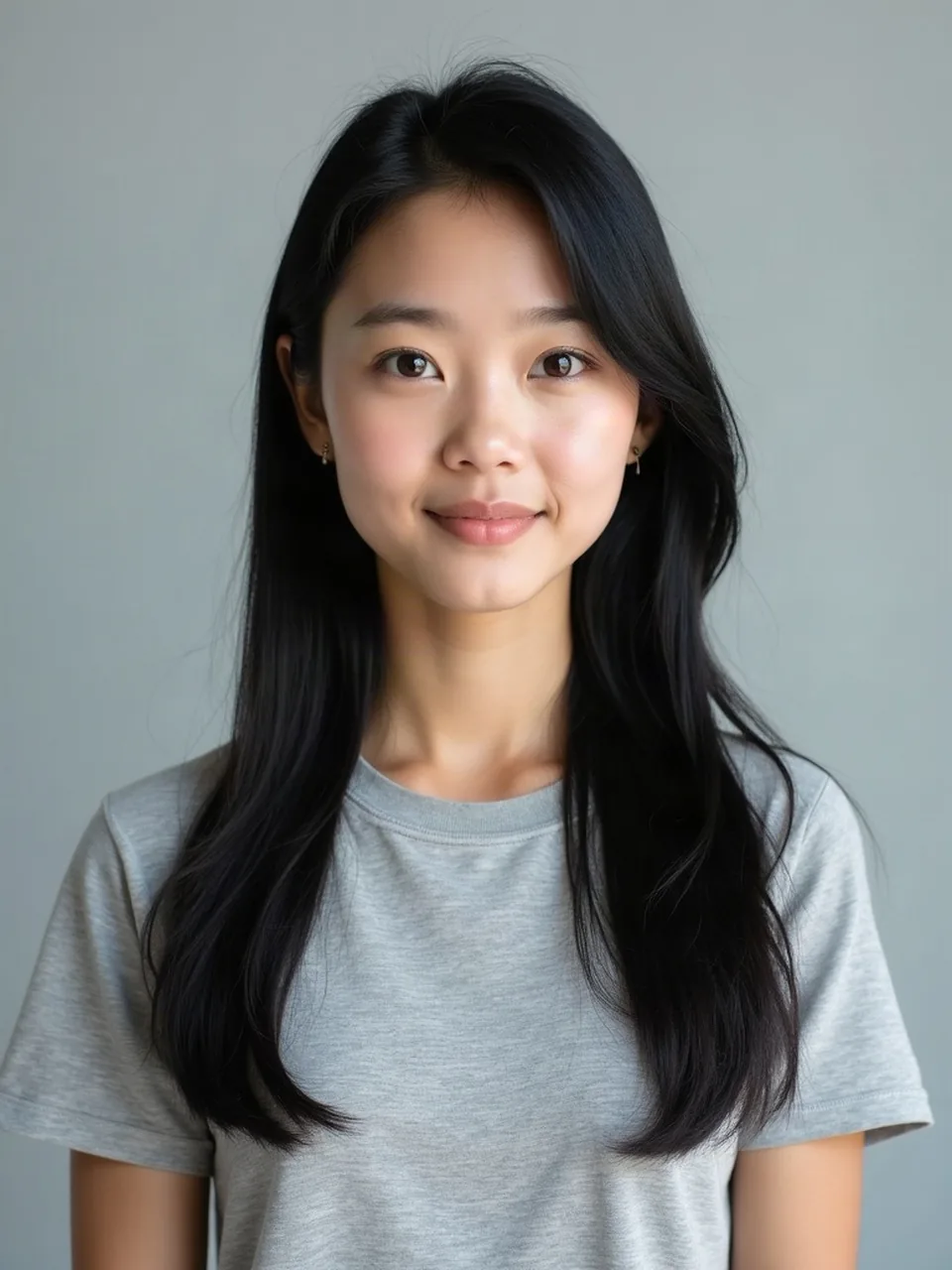
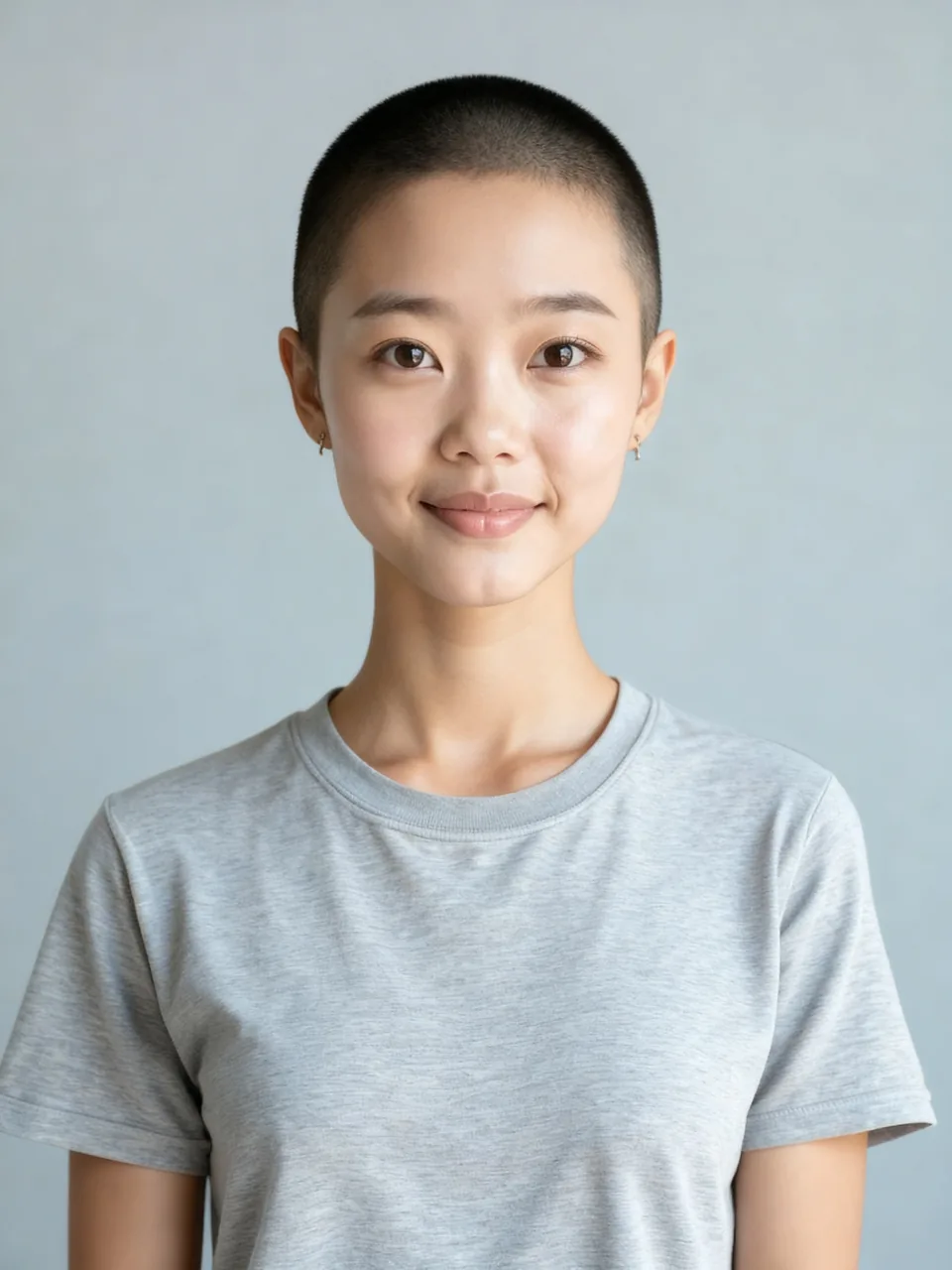
A buzz cut is decided in the chair in about ten minutes and then lived with. The useful question, what would I look like with a buzz cut, is really about the hairline, the cowlick, and the skull you already have, not about a trend. This filter draws clipper stubble and the edge where hair starts. It does not draw a bald scalp.
One buzz, not a guard menu
The run uses fal-ai/image-apps-v2/hair-change with target_hairstyle set to buzz_cut and hair_color set to natural. The model vendor prices that call at $0.04. Your account is not billed that vendor rate. A successful image is the thing that spends a preview or a credit, and a failed generation does not.
Barbers separate a #1 guard, about 3 mm, from a #2, about 6 mm, because those combs change how much scalp flashes through. This page has no guard picker. It asks for one even buzz in that clipper range: short enough that the skull reads, long enough that you still see hair. A single render cannot compare the two combs.
A buzz cut fade is a different shape: sides taken toward the scalp, a little more length on top. Nothing in this control says "fade." A slightly rough temple edge is not a spec you can hand a barber. If the sides go bare while the top stays furry, the render drifted. It is not a hidden fade style.
Bald is the other wrong reading. A buzz still has pepper. The forehead edge should be a hairline, not a smooth cap. When the crown comes back as bare skin with studio shine and no stubble, switch to the Bald filter. Do not talk yourself into calling that image a very short buzz.
What the length was hiding
Longer hair covers a high hairline, a widow's peak, and the spiral at the crown. A buzz uncovers all three, which is why people ask how would I look with a buzz cut the week the temples start to thin. A peak you already have will still be a peak. A cowlick that stands up at half an inch will not lie flat because the rest got shorter. If the photo hides the crown under a swirl, the model invents a growth direction, and invented growth is where a buzz picks up a ridge.
A flat crown, a bump at the back of the head, a narrow temple: those were always there. Longer hair rounds them. We ask the model to keep the head you uploaded and change the hair, not to rebuild the bone. It misses. If the forehead lengthens or an ear slides, run a clearer photo. Do not treat that image as a preview of surgery.
Ears are the classic surprise. Hair that covers the top of the ear is camouflage. Clippers stop providing it. The filter should leave your ears where they are, which means ears that already project will look more obvious. That is the point of checking before you cut. A frame that crops the ears, or tucks hair behind only one of them, hands the model a lopsided cue. Both ears in frame.
Glasses change the same face again. Thick frames eat forehead. If the decision is the office, upload the glasses you wear under fluorescent light, not a weekend shot in sunglasses. A summer buzz and a Monday buzz are the same stubble in a different week. The model applies no dress code. Your photo is the context.
Photos, files, and the one free look
Use daylight on the hairline. A gym selfie under a cap brim hides the only landmark that matters. Skip a beauty filter that already painted a new hairline. JPEG, PNG, or WebP, short edge at least 256 pixels, file under 8 MB. You tick "This is me and I am 18 or older." The filter is for adult faces only. An empty file, a file over the size cap, a short edge under 256 pixels, or a missing checkbox never calls the model and never charges. A missing model key fails the same way: clean stop, no charge.
Logged-out visitors get one watermarked preview. The long edge is 800 pixels, and EASYFACE sits on a diagonal. We remember that preview by IP and by cookie. It does not refresh the next morning, and signing up does not add credits. The HD file has no watermark and costs 1 credit when the image succeeds. Failures refund the credit or leave the free preview unused. Button-level steps are in How to use the buzz cut filter.
We ask the model to leave skin tone, clothes, and the background alone, and to keep the face recognizable. Natural color means this is not a dye job plus a cut. Compare eyes, nose, and ear height before you trust the hairline. That request is not a promise the likeness will hold.
Facial hair against the shorter head is a second pass with the Beard filter. Other cuts live under Hairstyles. For a group frame you are not ready to post raw, Face blur runs in the browser and does not spend this look.
FAQ
What would I look like with a buzz cut if my hairline is already high?
Like yourself, with the length gone and that hairline uncovered. The filter does not drop the hairline to a textbook inch above the brow. If the temples are in shadow, retake the photo and run it again.
How would I look with a buzz cut at work?
Put on the glasses and the collar you wear on a weekday, then upload that frame. A beach photo answers a different question. The stubble length does not change between the two; the face around it does.
Can I pick a #1, a #2, or a buzz cut fade?
No. One buzz, stubble visible, hairline visible. A fade and a guard number are barber instructions this control does not accept. Bare scalp belongs on the bald page.
Why do my ears look bigger?
Often they were that size, and the old length covered the top third. If the ear changed shape or moved, the model edited more than hair. That is a bad likeness, not a prediction that your ears grow in the chair.
Does a rejected file use up the free preview?
No. Rejected files never reach the model. A generation that errors after the call starts does not use the free preview either. One successful watermarked image does, and there is not a second free one. Last updated: 2026-10-08.
Last updated 2026-10-08.